Dash Procreate Lettering Brush: A Practical Evaluation for Hand-Lettering Projects
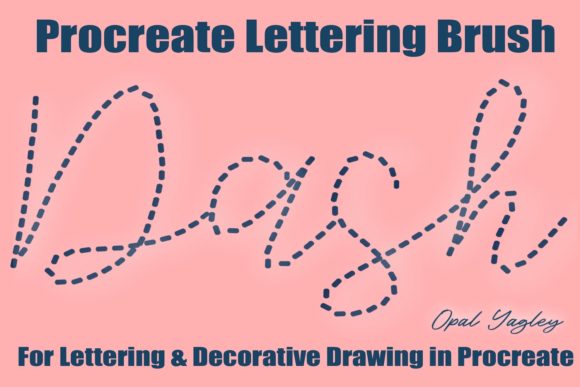
When exploring digital tools for hand lettering, the Dash Procreate Lettering Brush stands out as a specialized resource designed to introduce texture and rhythm to typographic work. This tool is not merely a standard brush that mimics ink; it is engineered to produce an instant dashed line effect on your lettering and hand-drawn elements. For artists seeking to add a specific stylistic flair without manually drawing every dash, this brush offers a streamlined workflow. However, understanding its unique mechanics is crucial before adding it to your digital toolkit.
Understanding the Core Functionality
The defining characteristic of the Dash Procreate Lettering Brush is its ability to generate a consistent, segmented stroke pattern. Unlike traditional calligraphy brushes that respond dynamically to pressure or tilt, this brush operates on a fixed logic. It creates a dashed line effect automatically as you draw. This means that whether you are creating a bold headline, a decorative border, or a stylized logo element, the output maintains a uniform dash structure throughout the stroke.
This consistency is particularly valuable for projects requiring a retro, mid-century modern, or industrial aesthetic. The brush eliminates the need for manual repetition, allowing the artist to focus on composition and flow rather than the tedious task of spacing individual dashes. The product includes one file of Procreate brush, ready to install, specifically named OPY-Dash-Lettering-Brush.brushset. Once installed, it integrates seamlessly into the Procreate interface, providing immediate access to this distinct style.
Key Technical Limitations and Workflow Considerations
To make an informed decision about using the Dash Procreate Lettering Brush, it is essential to acknowledge its technical constraints. The most significant factor for many users is that this brush is not pressure sensitive. In the world of digital art, pressure sensitivity often dictates line weight variation, opacity changes, or flow dynamics. With this specific brush, the line width and dash density remain constant regardless of how hard you press with your Apple Pencil.
Furthermore, the brush does not require the use of an Apple Pencil. While this might initially sound like a limitation, it actually broadens the accessibility of the tool. You can achieve the same dashed effect using a finger on the iPad screen or a generic capacitive stylus. This feature makes it a viable option for users who may not own the latest hardware or those who prefer a more tactile, less precise interaction method for certain design tasks.
However, the lack of dynamic control comes with a tradeoff. Artists accustomed to the fluidity of variable-width brushes may find the rigid nature of the dash pattern restrictive if they attempt to use it for organic, free-flowing sketches. The brush excels in controlled environments where uniformity is desired, but it may feel too mechanical for expressive, gestural lettering styles.
Installation and Accessibility
The user experience begins at the point of acquisition. The product is delivered as an instant download, which is highly convenient for digital creators who value speed. The file format is a standard Procreate brush set, ensuring compatibility with the app. A critical requirement for the installation process is that you must be on your iPad when you download the file. Attempting to download the file on a computer and then transferring it via email or cloud storage can sometimes lead to complications in opening the .brushset file directly within the Procreate environment.
Ensuring you have the correct device ready simplifies the setup. Once downloaded on the iPad, the brush appears in your library, ready for immediate experimentation. This "plug-and-play" approach reduces friction, allowing users to test the tool's capabilities without navigating complex file management systems.
Comparing Dash Procreate Lettering Brush to Alternative Approaches
Evaluating the Dash Procreate Lettering Brush requires looking at how it fits alongside other methods for achieving similar visual results. There are generally three approaches artists take to create dashed or segmented typography in Procreate:
- Standard Brushes with Texture Overlays: Many artists use a standard brush and apply a texture overlay or a stamp set to create the illusion of dashes. This method offers high flexibility but requires manual placement and alignment.
- Variable Pressure Brushes: Some specialized brushes simulate dashes by varying pressure. These allow for thick-to-thin transitions but often lack the precision of a fixed dash pattern.
- Dedicated Dash Brushes: This category includes the Dash Procreate Lettering Brush. It prioritizes automation and consistency over dynamic variation.
When comparing these options, the Dash Procreate Lettering Brush distinguishes itself through efficiency. If your goal is rapid production of uniform text with a dashed outline, this brush outperforms manual stamping. Conversely, if your project demands organic variation in the size of the dashes—such as a hand-painted look where the artist intentionally varies the spacing—the dedicated dash brush may fall short compared to a custom-stamped approach.
Contextual Use Cases
The suitability of this tool depends heavily on the intended application. For graphic design projects involving posters, album covers, or social media graphics where a clean, repetitive motif is needed, the brush is an excellent asset. It ensures that every instance of the lettering looks identical, maintaining brand consistency.
In contrast, for fine art illustration or personal journaling where imperfection is part of the charm, the rigid nature of the brush might feel too sterile. In these scenarios, an artist might prefer to combine the dash brush with other tools, perhaps using it for structural elements while employing a watercolor-style brush for accents.
Strengths, Tradeoffs, and Decision Factors
Selecting the right digital asset involves weighing specific benefits against potential drawbacks. The primary strength of the Dash Procreate Lettering Brush lies in its ability to produce a professional-looking dashed effect instantly. This saves time and reduces cognitive load, allowing the creator to focus on the overall design rather than the mechanics of the stroke.
However, the tradeoff is the loss of expressiveness. Because the brush ignores pressure input, it cannot convey the nuance of a human hand pressing harder or lighter on the page. This limitation means the tool is best suited for decorative purposes rather than expressive calligraphy. Additionally, the requirement to be on an iPad during download adds a minor logistical step that could be frustrating if not anticipated.
For professionals evaluating resources, the decision often hinges on the volume of work. If you frequently produce content requiring this specific aesthetic, the time saved justifies the investment. For occasional users, the cost-benefit analysis might differ, prompting a search for free alternatives or a willingness to learn manual techniques.
When to Choose This Tool
The Dash Procreate Lettering Brush is the right choice when:
- You need consistent, uniform dashed lines for branding or poster design.
- You want to speed up the creation of decorative elements without manual detailing.
- You do not require pressure sensitivity for the specific stroke type.
- You have immediate access to an iPad for the download and installation process.
Conversely, you may need another option if:
- Your project relies heavily on dynamic line weights and organic variation.
- You prefer to create custom textures using stamps or overlays for more control.
- You are working on a desktop computer and cannot easily transfer files to an iPad.
- You require a brush that responds to tilt and pressure for realistic handwriting simulation.
Final Thoughts on Integration
The Dash Procreate Lettering Brush represents a niche but valuable addition to the Procreate ecosystem. By focusing on a single, well-executed function—the creation of dashed lines—it solves a specific problem for designers and illustrators. Its non-pressure-sensitive nature and independence from the Apple Pencil make it accessible to a wide range of users, provided they understand the limitations of the tool.
Ultimately, the effectiveness of the Dash Procreate Lettering Brush depends on aligning its capabilities with your project requirements. It is not a replacement for versatile, all-purpose brushes, but rather a specialized instrument for achieving a particular visual style efficiently. For those willing to adapt their workflow to accommodate its fixed parameters, it offers a reliable path to creating polished, dashed typography with minimal effort.