Procreate Brush Christmas Light Glow for Holiday Design
There is a distinct magic that happens when you add a touch of illumination to a flat digital canvas. The Procreate Brush Christmas Light Glow kit transforms standard illustrations into vibrant, glowing scenes that instantly capture the festive spirit. Whether you are a seasoned graphic designer looking to streamline your holiday workflow or a small business owner creating custom merchandise, this brush set offers a professional solution for adding depth and atmosphere to your artwork.
Designed specifically for the Procreate app on iPad, these brushes leverage the unique pressure sensitivity of the Apple Pencil. This means the digital strokes respond to your hand just like real paint or light. When you press harder, the glow intensifies; when you apply a lighter touch, the effect softens. This dynamic interaction allows for organic, natural-looking results that static clip art simply cannot replicate.
Understanding the Core Features of the Kit
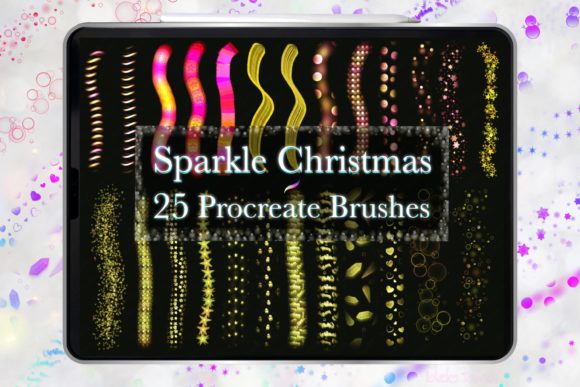
The heart of this collection lies in its 25 specialized brushes, each crafted to simulate different types of festive lighting and decorative elements. From twinkling fairy lights to neon-style ornaments and sparkling starbursts, the variety ensures you have the right tool for every specific design need. The "Christmas Light Glow" aspect is particularly effective because it mimics the way light diffuses in the real world, creating a halo effect around your shapes rather than just placing a solid color on top.
One of the most critical technical aspects of this kit is how it handles color. These brushes are engineered to work best with darker backgrounds. When applied to deep blues, rich reds, or midnight blacks, the colors pop with a luminous quality that feels authentic. However, if you use them on lighter backgrounds, the effects will naturally shift toward white or lighten significantly. Understanding this behavior is key to mastering the aesthetic; it encourages designers to think about contrast and layering from the very beginning of their creative process.
The package includes a single brushset file containing all 25 brushes ready for immediate import. Once downloaded, the integration is seamless. You do not need complex third-party software or tedious setup processes. The accompanying color palette is also optimized for use within the Procreate ecosystem, ensuring that the hues interact correctly with the brush dynamics.
Practical Applications for Professionals and Hobbyists
The versatility of the Procreate Brush Christmas Light Glow extends far beyond simple holiday greetings. For entrepreneurs and freelancers, this toolkit opens up lucrative opportunities in the physical product market. Imagine designing a custom t-shirt featuring a sweater pattern made entirely of glowing neon lights, or creating a high-end wall art piece where the stars seem to twinkle off the canvas. The ability to create high-resolution, pressure-sensitive designs makes these files ideal for print-on-demand services.
- Merchandise Creation: Use the brushes to generate eye-catching patterns for mugs, tumblers, and tote bags. The glow effect adds a premium feel that can justify higher price points in competitive markets.
- Digital Marketing: Social media managers and bloggers can utilize these brushes to create engaging seasonal graphics. A blog post header adorned with realistic Christmas light borders can significantly increase click-through rates during the holiday season.
- Event Planning: Invitations and greeting cards benefit immensely from the sparkle and ornamentation features. Instead of generic text, you can design custom invitations that look like they were hand-painted with actual lights.
Educators and hobbyists also find immense value in this resource. It simplifies the learning curve for students interested in digital illustration by providing pre-configured tools that handle complex blending and lighting effects automatically. This allows learners to focus on composition and creativity rather than struggling with layer settings or opacity masks.
Maximizing Efficiency and Brand Engagement
In the fast-paced world of digital content creation, time is a valuable currency. This brush set addresses the common pain point of manually creating lighting effects. By using pressure-sensitive strokes, you can achieve what might take hours of manual layering in seconds. This efficiency translates directly to productivity, allowing creators to produce more projects without sacrificing quality.
From a branding perspective, consistency is crucial. The cohesive nature of the 25-brush set ensures that your visual identity remains uniform across various assets. Whether you are designing a gift tag, a website banner, or a scrapbook layout, the style remains consistent. This uniformity builds trust with your audience and reinforces brand recognition.
The tactile feedback provided by the Apple Pencil further enhances the user experience. There is a psychological connection between the artist's hand movement and the resulting image. This connection often leads to more expressive and emotionally resonant designs. When a customer sees a design that feels "alive" and dynamic, they are more likely to engage with it, share it, or purchase the associated product.
Implementation Tips for Best Results
To get the most out of the Procreate Brush Christmas Light Glow, consider the following practical strategies:
- Layer Separation: Always place your glowing elements on a separate layer above your base artwork. This gives you the flexibility to adjust opacity, blend modes, or color without affecting the underlying details.
- Color Experimentation: While the brushes work well with standard colors, try experimenting with gradient fills behind your strokes. Combining a gradient background with the pressure-sensitive glow can create stunning depth.
- Scale Awareness: Remember that these brushes are designed for high-resolution screens. If you plan to print large formats like wall art, ensure your canvas resolution is set appropriately (usually 300 DPI) to maintain crisp edges.
- Contextual Usage: Don't overuse the effect. Sometimes a subtle hint of glow is more elegant than an overwhelming burst of light. Use the brushes to draw attention to specific focal points, such as a logo or a central ornament.
Technical Considerations and Licensing
It is important to note that this kit is exclusive to the Procreate app. The brushes are proprietary files designed specifically for the application's engine and will not function in other drawing software like Photoshop or Illustrator. This limitation ensures optimal performance but requires users to have an iPad and the Procreate license.
Regarding usage rights, the creator, ©idelotama, has established clear guidelines to protect intellectual property. The license permits personal and commercial use for end products (like selling a t-shirt design), but strictly prohibits sharing, selling, reselling, or redistributing the raw brush file itself. This distinction is vital for maintaining the integrity of the digital marketplace. Users must respect these terms to support the continued development of high-quality creative tools.
By adhering to these guidelines and leveraging the powerful capabilities of the Procreate Brush Christmas Light Glow, creators can elevate their seasonal designs to a new level of professionalism. Whether you are crafting a heartfelt anniversary card or launching a holiday merchandise line, these brushes provide the essential tools needed to bring your vision to life with brilliance and precision.