Revolutionize Your Digital Art with Brushes Flowers Creator for iPad Pro
In the rapidly evolving world of digital illustration, finding the right tools can make the difference between a good sketch and a masterpiece. For artists working on the iPad Pro with the Apple Pencil, precision and variety are paramount. This is where the Brushes Flowers Creator steps in as a game-changer. It is not merely an add-on; it is a comprehensive toolkit designed to streamline your workflow while delivering stunning, organic results that mimic traditional media.
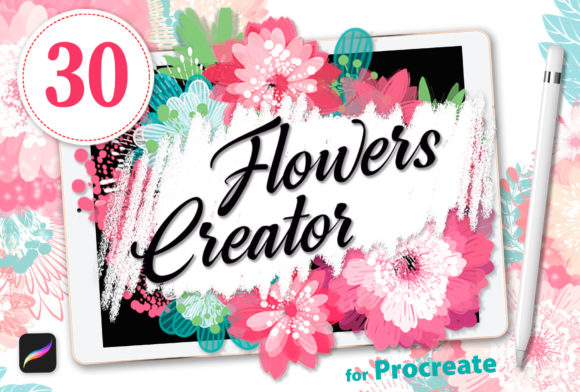
Imagine being able to create intricate floral arrangements, delicate petals, and complex decorative elements with a single stroke. No more struggling with layering or manually painting every vein on a leaf. With this versatile set, you gain access to 32 specialized brushes and 6 stamp brushes specifically optimized for Procreate. The result? Amazing visual quality saved by a significant reduction in drawing time.
Why Professional Artists Are Switching to Specialized Brush Sets
Digital art has democratized creativity, allowing anyone with an iPad to produce professional-grade work. However, the learning curve for creating realistic textures from scratch remains steep. Many artists spend hours trying to master the mechanics of simulating watercolor blooms or textured petals using standard default brushes. This is where the Brushes Flowers Creator solves a critical pain point.
The philosophy behind this toolset is simple: efficiency without sacrificing artistic integrity. By providing pre-engineered brushes that respond naturally to pressure and tilt, the software handles the heavy lifting. You focus on composition, color theory, and storytelling, while the brushes handle the execution of complex botanical forms. This shift allows illustrators to move faster, meeting tight deadlines without compromising on the "hand-painted" feel that clients love.
The Power of 32 Custom Procreate Brushes
The core of this collection lies in its 32 distinct brushes. Each one is crafted to replicate a specific aspect of flower creation. Whether you need a brush for soft, airbrushed backgrounds or a sharp, textured tool for defining stamens, there is likely a dedicated option within the set. Let's break down what makes these brushes so effective:
- Pressure Sensitivity: When used with the Apple Pencil, these brushes react dynamically. A light touch creates faint, ethereal petals, while pressing harder adds depth and texture. This mimics the behavior of real paint or charcoal.
- Texture Integration: Unlike flat vector shapes, these brushes carry inherent grain and noise. This prevents the image from looking too "digital" or sterile, giving it a tactile, organic quality.
- Shape Versatility: From round blossoms to elongated leaves, the variety ensures you have the right tool for every part of the plant. You aren't limited to just flowers; the set includes tools for stems, thorns, and foliage.
Installing these brushes is straightforward. Once downloaded into your Procreate library, they appear alongside your other tools. You can start drawing immediately. There is no complicated setup process or external plugins required. This seamless integration means you can jump straight into your creative flow, whether you are sketching a quick concept or finalizing a print-ready illustration.
Mastering the Art of Decoration with Stamp Brushes
While custom brushes allow for freehand creation, sometimes you need consistency and speed. This is the unique value proposition of the 6 Stamp brushes included in the Brushes Flowers Creator package. Stamps are often misunderstood as lazy shortcuts, but in the hands of a skilled artist, they are powerful assets for maintaining design coherence.
- Pattern Repetition: If you are designing a border for a wedding invitation or a background pattern for a textile, stamps ensure every element looks identical. This level of uniformity is difficult to achieve with freehand drawing alone.
- Speed and Consistency: For commercial projects like greeting cards or social media graphics, time is money. Stamping a cluster of roses takes seconds rather than minutes. Yet, because the brushes are high-resolution and vector-based, the output remains crisp at any size.
- Layering Capabilities: The stamps are designed to work well with Procreate's layer system. You can place a base flower, then use a stamp to add a secondary bloom on top, creating depth and complexity instantly.
Think of these stamps not as replacing your creativity, but as accelerating it. They provide the building blocks that you can then customize with the 32 dynamic brushes. For instance, you might stamp a basic rose shape and then use a texture brush to add dew drops or weathering effects. This hybrid approach offers the best of both worlds: speed and detail.
Integrating into Modern Creative Workflows
The adoption of tools like Brushes Flowers Creator reflects a broader trend in the design industry towards mobile-first workflows. The iPad Pro has become a legitimate workstation for graphic designers, fashion illustrators, and children's book authors. The portability of the device, combined with the power of the Apple Pencil, allows artists to work from coffee shops, studios, or even their beds.
In a modern project pipeline, this brush set fits perfectly into several stages:
Conceptualization: During the initial brainstorming phase, artists can quickly sketch out various floral motifs to present to clients. The ability to generate different styles in minutes helps in exploring options rapidly.
Production: Once a concept is approved, the production phase requires precision. The detailed brushes allow for high-fidelity rendering suitable for large-format printing. The stamps help in creating repetitive elements for packaging or wallpaper designs efficiently.
Post-Processing: Even after the main illustration is complete, these brushes can be used for retouching. Adding subtle floral accents or adjusting lighting on existing elements becomes much easier with the right texture tools.
Practical Considerations for New Users
If you are considering adding the Brushes Flowers Creator to your digital arsenal, it is important to understand how it fits into your current skill level and hardware. While the tools are powerful, they require a bit of finesse to master. Here are some practical tips to get the most out of the set:
Start with the Basics: Don't try to create a full garden bouquet on day one. Start by experimenting with individual petals and leaves. Understand how the pressure sensitivity works for each specific brush. Some may be better for filling areas, while others excel at fine lines.
Hardware Requirements: To truly appreciate the capabilities of these brushes, an iPad Pro is highly recommended. The larger screen real estate provides the space needed for detailed work, and the Apple Pencil's low latency ensures that your strokes follow your hand movements perfectly. Older iPads may struggle with the performance demands of such a diverse brush set.
Customization is Key: One of the greatest strengths of Procreate is its ability to tweak settings. After installing the Brushes Flowers Creator, don't be afraid to adjust opacity, flow, or color dynamics. You can turn a vibrant red petal into a soft pink ghost simply by changing the blending mode. The brushes are designed to be flexible, adapting to your personal style.
Real-World Applications and Scenarios
Where exactly can you apply these tools? The possibilities are virtually endless. Consider a freelance illustrator tasked with creating a series of botanical prints for a home decor brand. Using standard brushes, this project might take weeks. With Brushes Flowers Creator, the artist could produce the entire series in days, utilizing the stamps for consistent framing and the custom brushes for unique, hand-drawn details.
Similarly, for content creators on platforms like Instagram or Pinterest, visual appeal is everything. High-quality, detailed floral illustrations stop the scroll. The ability to create eye-catching graphics quickly allows influencers and brands to maintain a consistent posting schedule without burning out.
Even educators find value in this toolset. Teaching art history or botany through digital illustration becomes more engaging when students can easily render accurate plant structures. The educational barrier is lowered, allowing students to focus on learning about plant anatomy rather than fighting with software limitations.
Final Thoughts on Elevating Your Art
The journey of a digital artist is one of continuous learning and tool refinement. As technology advances, the line between traditional and digital art continues to blur. Tools like Brushes Flowers Creator bridge that gap, offering the soul of traditional painting with the convenience of digital editing.
By investing in a specialized set that includes 32 Procreate brushes and 6 stamps, you are not just buying a file; you are acquiring a new way of thinking about composition and texture. It empowers you to save time, reduce frustration, and focus on what really matters: bringing your imagination to life. Whether you are a seasoned pro or just picking up the Apple Pencil for the first time, this versatile collection offers a clear path to amazing results.
So, install the brushes, fire up your iPad Pro, and let your creativity bloom. The only limit is your own vision.